Hello, and happy Thursday! This is my first time posting on the Write Stuff blog, and I want to send a huge “thank you” to Marcia for making it possible. I’m fairly new to the site, but look forward to interacting with all of you and contributing content. Kudos to Marcia for creating such an exceptional writerly hang-out in the blogosphere!
The post I’m sharing today was modified from one I ran on my blog the end of May. Many authors found it helpful, most of whom had never heard of Facebook’s Author App, so I thought it would be good content to share here.
I’m not usually a fan of Facebook (although I’ve been making an effort to embrace it lately). I’m much more of a Twitter girl, but FB’s Author App is a handy plug-in for writers, and it’s easy to install on your author page.
Follow these simple steps:
- Click the link (provided below)
- Select your page
- Go to the app (it will most likely appear under the “More” tab at this point)
- Add your profile
- Add books
- You can even add information on upcoming book signings!
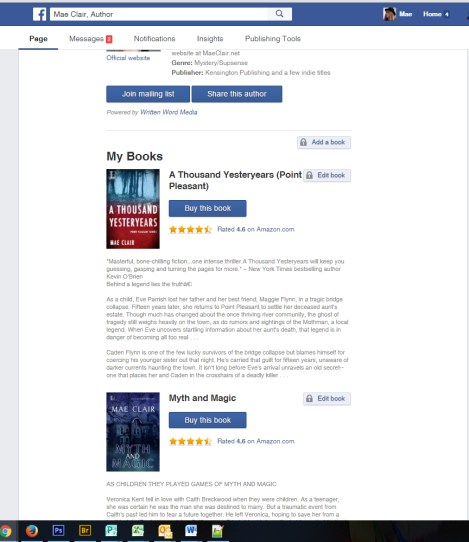
The screenshot above was captured from the app on my page.
Pretty nifty, huh? Each book gets its own little section, and the best part is all you have to do is add the AISN or ISBN and the app automatically grabs the related content. You can also arrange what order you want your books listed.
I did discover, however, that the app doesn’t like apostrophes or italics (basically anything that isn’t HTML compliant).
After my books uploaded, I went back and edited all of the apostrophes getting rid of the gobbly-gook. Now I’ve got a neatly streamlined page with books, purchase links, and star ratings.
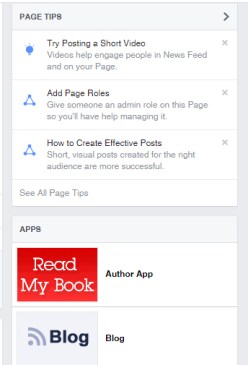 Before Facebook rearranged their page layout (yet again), it was possible to put a tab for this at the top of the page so it was immediately visible. Now it appears in the right sidebar halfway down the page, as seen here.
If you have multiple apps connected to your FB page, you can rearrange them and put the READ MY BOOK (author app) at the top, but FB won’t allow you to bump it above their default blocks such as Search, Info, Page Tips, etc.
If you’d like to see how the whole thing works, visit my page and click on the Author App tab for the full effect of how your books appear. You also get an author profile. You can find my page at https://www.facebook.com/maeclairauthor/
If you haven’t visited my page before, I’d be (Snoopy dance) happy if you considered dropping it a “like.” 🙂 If you include the link to your page in the comments below, I will return the favor!
The whole thing is pretty cool, don’t you think? So where exactly can you get this awesome app? Just click this link, and you’ll be set to go: https://apps.facebook.com/authorapp/
~ooOOoo~
 Mae Clair has been chasing myth, monsters and folklore through research and reading since she was a child. In 2013 and 2015, she journeyed to West Virginia to learn more about the legendary Mothman, a creature who factors into her latest release.
Mae pens tales of mystery and suspense with a touch of romance. Married to her high school sweetheart, she lives in Pennsylvania and numbers cats, history and exploring old graveyards among her passions. Look for Mae on her website at MaeClair.net
Connect with Mae at the following haunts:
Website
Blog
Twitter (@MaeClair1)
Google+
Facebook Author Page
Amazon Author Page
Goodreads
Newsletter Sign-Up


 The Write Stuff